
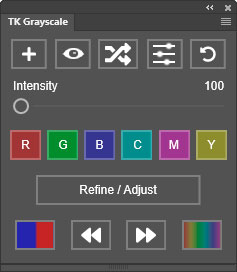
The TK Grayscale plugin offers new and unique ways to create black and white images in Photoshop.
Features
- Convert color images to black and with a single button click.
- “Randomize” button generates a continuous stream of different conversion options.
- “Step Forward” and “Step Back” buttons allow easy cycling through generated options.
- Intensity slider enhances tonal contrast based on color differences in the original image.
- Channel buttons generate black and white images based on traditional color channels (Red, Green, and Blue) and also on virtual color channels (Cyan, Magenta, and Yellow).
- 8-bit, 16-bit, and 32-bit images supported.
- Quickly switch to Photoshop’s Properties panel to refine initial conversions made with the plugin.
- “Live Clipping” monitors for clipped highlights and shadows that might result from converting to black and white.
- “Color Toning” button allows for quickly creating and adjusting toning options, like a sepia tone.
- Save and reuse presets of favorite conversion settings.
- One-click reset to start over at any time.
- Embedded tooltips provide an overview of button and slider functions.
- “Back up” and “Restore” options preserve user settings.
The TK Grayscale plugin works the same on Mac and Windows computers easily installs into Photoshop with a custom installer. Photoshop 2023 version 24.7.0 or later is required to install and use it. (NOTE: It is recommended to always use the latest version of Photoshop or Photoshop Beta as that is what is used for development and troubleshooting.)
Resource download
PriceVIP only
Only VIP downloadUpgrade VIP
Buy now


Comments0